The latest BahnDeutsch 3.4.46

BahnDeutsch · German for your next chapter

German for the life ahead.

From your first introduction to appointments, interviews and everyday conversations. Build a routine with A1–B2 courses, practical stories, vocabulary review and speaking practice.

  • Persian meanings and guidance
  • One website and app account
  • Android and iPhone web app
BAHNDEUTSCHDEIN DEUTSCH. DEIN WEG.
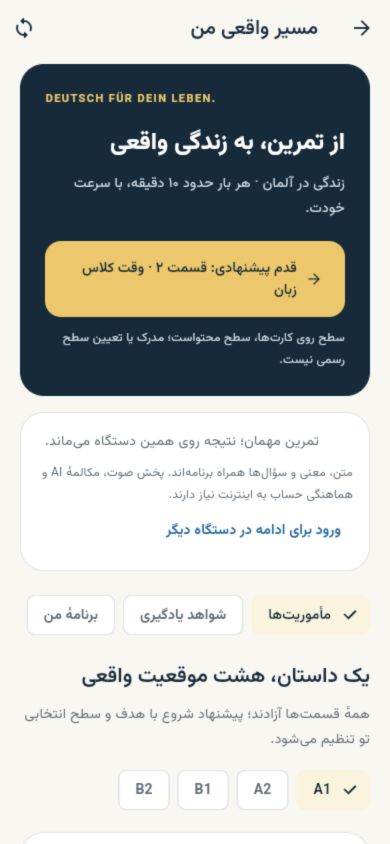
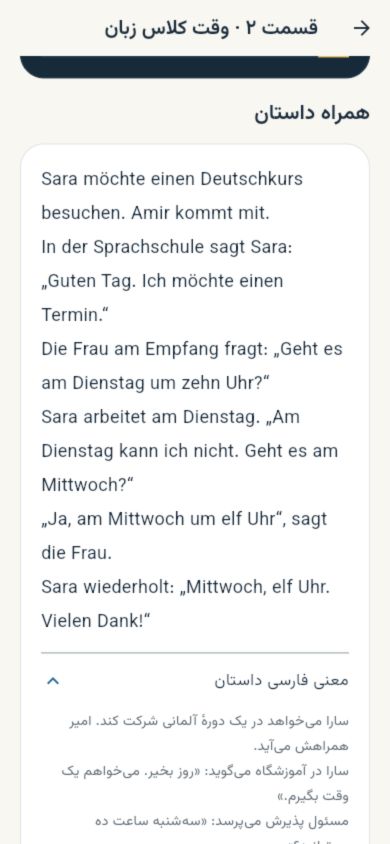
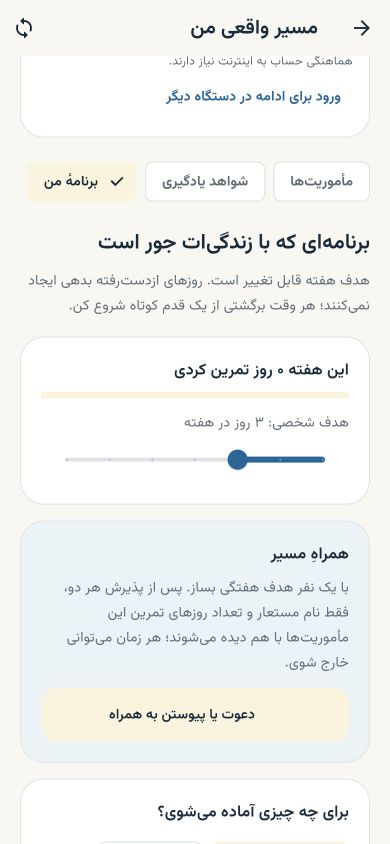
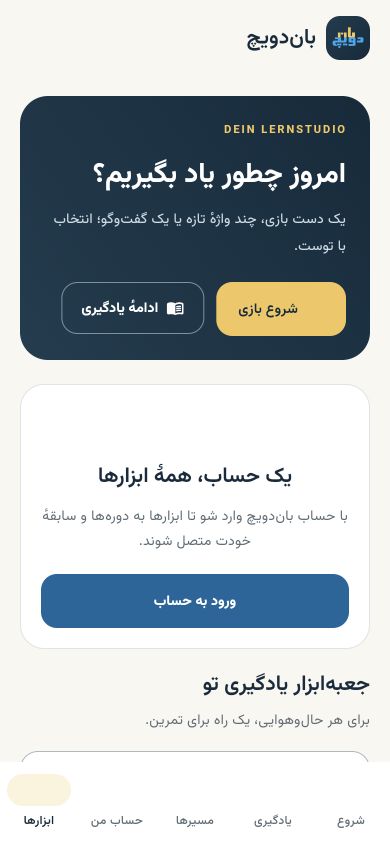
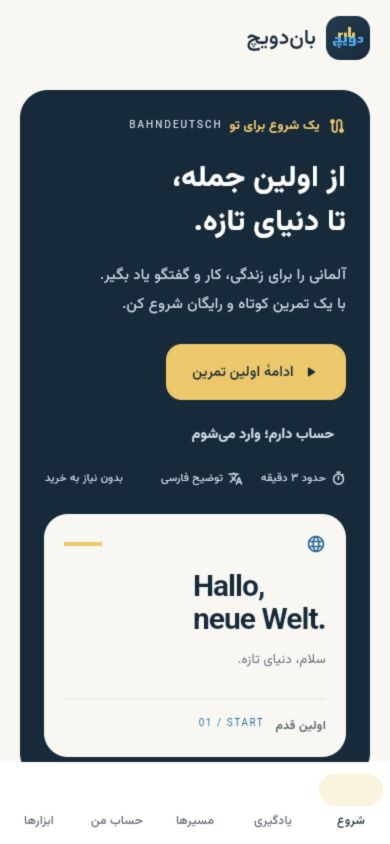
A real screen from the app
8everyday and work missions
40practice and recall questions
24useful phrases with meanings
A1–B2learning content levels

Take a closer look

A clear next step. On every screen.

Real screenshots of BahnDeutsch, from choosing a mission to learning and planning your routine.

Open a screenshot for the details. On a phone, swipe through the gallery.

Screenshots show the Persian interface of the web app. Layout and available features may vary by device, version and account access.

What is new 3.4.46

More purposeful practice. An easier way to continue.

See what you are practising, what you remember and what comes next.

  1. Stories connected to everyday life

    Eight situations with Sara and Amir, 24 phrases and 40 questions, with Persian meanings and explanations.

  2. Spaced recall with fresh questions

    After practice is complete, new recall questions unlock from the next day. Server records distinguish verified account recall from local practice.

  3. Progress you can continue

    Mission answers save on your device first. Signed-in answers sync to that account when connected; guest practice remains separate.

  4. Speaking in the same context

    Take a mission topic into coaching and voice conversation through the app’s connected audio and AI services.

  5. A shared goal, by mutual choice

    Create a shared weekly goal through an invitation and acceptance by both people. Each person controls their membership.

  6. From practice to a teacher session

    Prepare a practice summary for a teacher session if you choose. Sharing information and booking remain your actions.

  7. Stay signed in on iPhone

    Your account is securely restored when you reopen the app. Signing out, an expired session or clearing browser data requires a new sign-in.

  8. Keep your worksheet before leaving

    When a teacher worksheet has unsaved edits, choose to save it on this device, keep editing or leave without saving.

  9. A guided introduction to each feature

    44 feature guides, currently in Persian, introduce app sections on your first visit. Replay a guide from that section’s help button. Your viewing preference is stored locally for each account on this device; a guide does not automatically open during an active exam or call.

  10. Speak German, hear corrections in Persian

    BahnBot realtime voice practice encourages you to speak German. Practise detected mistakes with spoken Persian explanations and a correct German example. Choose the coach’s humor level and voice in your account settings.

  11. Practise the conversation from this lesson

    Open prepared conversations and situations from the learner guide for voice roleplay at each level. The call receives that exercise’s title, level, roles and dialogue. You choose when the microphone starts; each call lasts up to 10 minutes.

  12. Live conversation testing status

    Browser tests cover capture, playback, interruption and the feedback cycle using a test microphone. Conversation quality with the real service and on a physical phone has not yet been tested.

Some practice works offline

After the app loads, story mission texts, meanings and questions are available offline. Audio, AI, sync and other lessons need internet.

Feedback to support learning

Speaking practice and feedback are learning aids, not a recognised language certificate or laboratory phoneme assessment.

A clear subscription in one account

Courses and some services need a purchase or monthly site subscription. Current prices and terms appear on the website before payment.

The subscription is called “Monthly site subscription”. Access depends on the courses, validity and quotas on the same account. View courses and subscription terms

01 / Download & install

Find the version for your device

Android: a direct download. iPhone: a web app in Safari. You can also install the website for access to its web features.

Recommended for your device

Computer: open the learning web app

Open the learning web app in your browser and continue with your existing BahnDeutsch account. Expand the options below for mobile installation.

Open the learning web appDownload the official Android app
Other installation options and device guides

For learning, use the official Android app or learning web app. The installable website is a shortcut to the website shop and account; you do not need both.

ANDROID

BahnDeutsch · Android

Learner guides, audio pronunciation, a refined Leitner system and one learning workspace, using your BahnDeutsch curriculum and account.

v3.4.46 · 83.7 MB · Android 7+ · ARM 32/64

Download BahnDeutsch for Android

Play Protect warning about an unfamiliar developer

These steps apply only to this message:

Play Protect hasn't seen an app from this developer before. It may be unsafe.

Only if you see this exact message and downloaded the APK from bahndeutsch.ir, open “More details”. If “Install anyway” is offered, you can select it to continue installation.

If that option is absent or the warning says something different, use the website install guide and sign in with the same account.

Website install guide
Install and update

Open the APK and, if asked, allow installation from this browser. This file updates installed BahnDeutsch Next versions. Users of the older 3.1.44 app should install the new app and sign in with the same account; courses and account information come from the website.

Previous Android version 3.1.44

v3.1.44 · 100.4 MB · Android 7+

Download previous version 3.1.44
iPHONE / iPAD

Dedicated iPhone web app

This is the app’s own web version, separate from the website PWA. Open the app in Safari:

Open iPhone app

Web app in Safari · No App Store required

Installation guide
  1. Tap Share.
  2. Choose Add to Home Screen.
  3. Enable Open as Web App if shown, then tap Add.
WEBSITE PWA

Website PWA

Open the website’s courses, shop and account panel from an icon on your Home Screen.

Website PWA install guide

The installable website, separate from the iPhone web app

Verify Android download SHA-256

Your downloaded file’s SHA-256 should match the value below.

BahnDeutsch 3.4.46

1af11ed640fb0204f96d8cd056ce4128685dc3484ecebe5f853724f4cc02f9acStable release information

Previous Android version 3.1.44

9427b6f45df9a09d77dd2290122a701496a8eb739df21b8356f2a1ed4bceab3dPrevious release information

02 / App features

Everything you need to master German

Structured courses, AI, native games and a secure account — all in one German learning app.

Structured learning

  • A1–B2 courses

    Video, practice, daily tests and a final exam for every level on your phone.

  • Daily study plan

    An 8–12 minute path each day. If articles are weak, Article Land opens inside it.

  • Media library

    Levelled video and audio, ready for native playback.

  • Online tests

    Placement and course tests that show your real weak spots.

AI & review

  • Specialist German chatbot

    Grammar, culture, history and German law — teaching answers, not dry translation.

  • Leitner system

    Spaced-repetition vocabulary, fully synced with the website.

  • AI writing evaluation

    Instant feedback on your German texts with corrected sentences.

  • German Mind Reader

    Phrase of the day and meaning-guess practice to build language instinct.

Mobile-only tools

  • Amt office simulator

    Role-play German admin appointments with tone and stress feedback.

  • Six native games

    Article Land, prepositions, verb conjugation and online word battles.

  • Activity and streaks

    See your activity points, daily streak and learning history.

  • Eight story missions

    Practise eight everyday and work situations with Sara and Amir through German stories, Persian translations and Persian feedback.

Account & security

  • Secure fast login

    Sign in with an SMS code or your account password. SMS requires an Iranian mobile number. Use the same BahnDeutsch account to access your courses and previous purchases.

  • Unified payments

    Buy courses and subscriptions on the web; access unlocks instantly in the app.

  • Course certificates

    Issue a certificate after you meet each level's requirements.

  • Persian interface

    Readable Persian layouts alongside German words and examples.

Features may vary by version, device and your active course or subscription. Sync, live classes and AI services require an internet connection.

Who it's for

From moving to Germany to exam day — one app for your goal

Content is levelled; pick the path that matches what you actually need.

Moving and living in Germany

Office simulator, law-aware chatbot and everyday vocabulary for forms, appointments and real conversations.

Exams and study

Daily A1–B2 plans, online tests and completion certificates for Goethe-style and classroom paths.

Work and CV

Formal writing with AI feedback, job vocabulary in Leitner and targeted speaking practice.

Daily practice on the go

Short games, vocabulary review and streak tracking for daily practice.

03 / Games

Games that actually teach German

Article Land

A der/die/das world that becomes today's gate when articles are the weakness.

Article adventure

Practice noun gender stage by stage.

Preposition master

Akkusativ, Dativ and two-way prepositions.

Verb conjugation

Master tenses and forms through challenges.

Verb + preposition

Lock in combos like warten auf and denken an.

Word battle

Online vocabulary matches with friends or a random opponent.

Sync

One account. Keep going on any device.

Sign in with your website account to access your courses, purchases and Leitner cards. Start on your phone and continue on the web.

Registration and some content are free. Some courses and features require a purchase or subscription.

View courses & subscriptions

Getting started

From installation to your first practice

  1. Install your version

    Download the Android app or add the iPhone web app to your Home Screen.

  2. Sign in to your account

    Use the same BahnDeutsch account to keep access to your courses and purchases.

  3. Choose your path

    Start at A1 or use the placement test to find the right course and practice.

04 / Questions

Before you download the German learning app

Features may vary by version, device and your active course or subscription. Sync, live classes and AI services require an internet connection.

Are these actual screenshots?

Yes. They show the Persian web app interface. Layout and feature access can differ by device, version and account.

What works offline in story missions?

Once the app loads, German texts, Persian meanings and questions in eight missions are available, with answers saved on the device. Audio, AI and account sync need internet. Full course downloads are not available.

How does the monthly site subscription apply to the app?

The app uses your BahnDeutsch account. Course and subscription features follow that account’s purchases, validity and quotas. Current prices and terms appear on the website before payment.

Is the BahnDeutsch app free?

Registration and some content are free. Full A1–B2 courses and subscriptions are purchased in the web shop and activate instantly in the app.

Does app progress sync with the website?

Yes. With one account, course progress, Leitner, purchases and subscriptions are identical on web and app.

How do I download and install the Android app?

Tap download, get the official APK, and if Android warns about unknown sources allow installs from this browser. Then sign in with your BahnDeutsch account.

Does it work on iPhone?

Tap Open on iPhone to launch the official web app in Safari. Then choose Share and Add to Home Screen, and sign in with your website account.

How do I sign in?

Sign in with an SMS code or your account password. SMS requires an Iranian mobile number. Use the same BahnDeutsch account to access your courses and previous purchases.

Can I practise German offline?

Once the app has loaded, the text, Persian translations and questions in eight story missions work offline, and answers are saved on the device. Audio pronunciation, AI conversations and account sync need internet. Other lessons and Leitner cards are loaded online.

What is the German office simulator?

Amt Simulator role-plays Bürgeramt visits and admin appointments and gives feedback on tone, stress and the next step — useful for moving to Germany.

How do the iPhone web app and website PWA differ?

The iPhone web app is the app’s web version at /ios/. The website PWA adds the website itself to your Home Screen. Both install through a browser; available features may vary by version and device.

Where do I get my certificate?

After you finish the daily plan and hit the required scores, download the certificate from the web or app dashboard.

Which level should I start in the app?

Start at A1 if you are a beginner. Otherwise the placement test suggests a starting point; every level through B2 is in the app.
DEIN DEUTSCH. DEIN WEG.

Your next lesson. Wherever you are.

Choose your version and keep your German learning moving.

Choose your app
A real screen from the app